REVIEW · SYDNEY
Australia and New Zealand eSIM (3 to 30 days. Up to 45GB)
A phone signal in a new country is not guaranteed. This eSIM setup keeps you connected across Australia and New Zealand without airport hassle. You get a data plan you can start fast, plus the option to match the days you will actually travel, from a short stop to a longer trip.
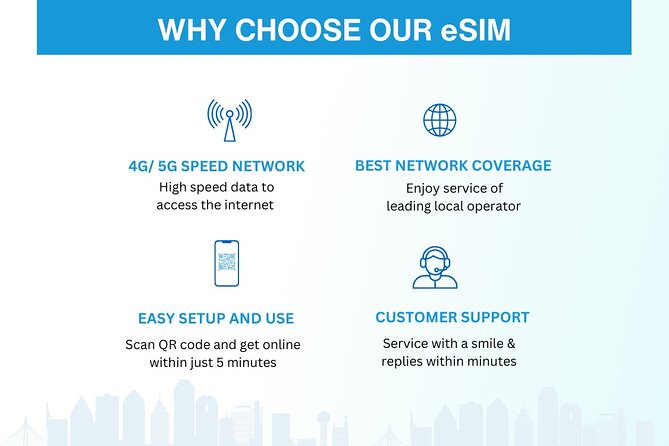
What I like most is the email delivery and QR-code activation, which is exactly what you want when you land and just need to get oriented. I also like that the data is 4G/5G where available and priced as “local rates” rather than the usual fear of surprise roaming charges.
The main drawback to plan for is device fit and setup time. This works only if your phone supports eSIM, and installation can take a bit and feel fiddly at first.
Key Things To Know Before You Buy
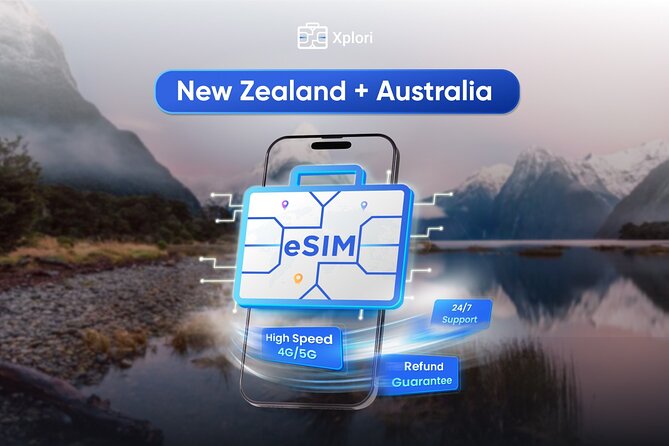
- Works in both Australia and New Zealand: Your plan covers both countries, so you do not need to juggle two SIMs.
- Activate by scanning a QR code: You can get connected within minutes after you start activation.
- 4G/5G speeds capped at your package: High-speed data is limited to the amount included, then slows down.
- After the cap, speed switches to 3G: You can still stay online, but at reduced speed.
- Remote support is available by email: If activation or setup gets stuck, you can ask for help.
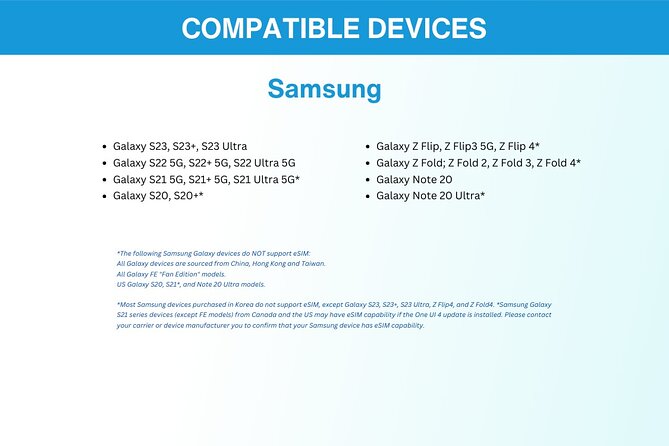
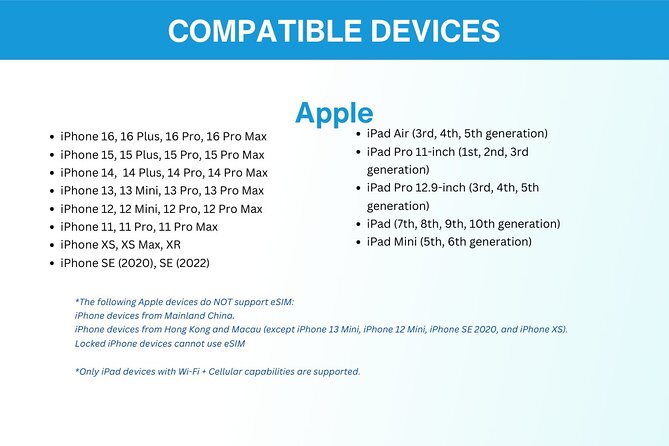
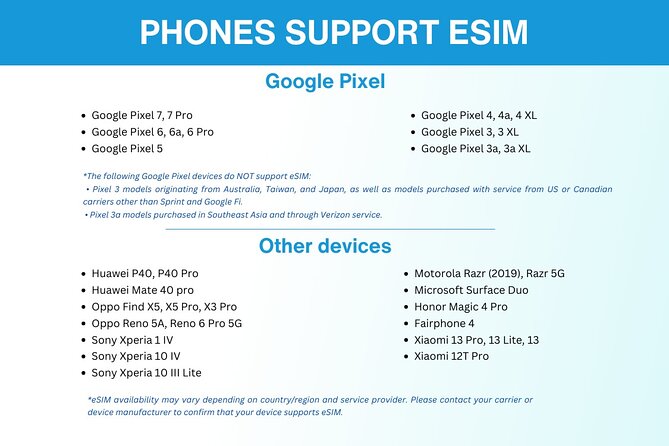
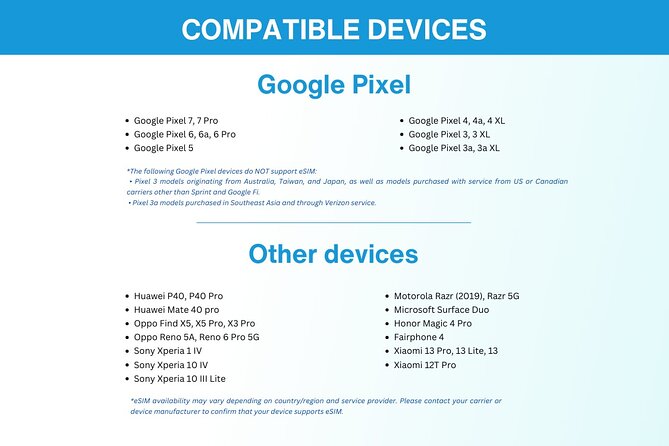
- Most travelers can use it, but check eSIM first: iPhone XS and later, Pixel 3 and later, Samsung S20/S21/Fold are listed as examples.
What This Australia and New Zealand eSIM Actually Does (And Why It’s Useful)
Think of this as a “connect-first” tool for your trip. The core promise is simple: you buy an eSIM, get it by email, and activate it by scanning a QR code. Once it is live, you use mobile data in Australia and New Zealand for your chosen number of days.
That matters because mobile data is not just entertainment. It is maps when you are trying to find a station, a bus route, or the right street to turn on. It is translation when language barriers show up. It is also the basic safety net, the thing that lets you message family and keep tabs on your schedule.
You also get flexibility. The plan length is 3 to 30 days, and the package includes mobile data for the duration you select. That is practical if you are hopping in for a week, or if you are doing a longer Australia-to-New Zealand loop.
You can also read our reviews of more tours and experiences in Sydney.



Value check: $5 per person
At $5 per person, the value is mostly in what you avoid: buying a SIM at the airport, dealing with activation in person, and potentially running into language or payment friction when you are tired after travel. If you would otherwise spend time and effort getting set up on arrival, this is the kind of spend that feels small while saving a lot of hassle.
One more value point: eSIM is convenient when you travel light. No SIM tray hunting, no tiny pieces that can get lost, and less waiting once you have a working signal.
Price, Data Limits, and What “Local Rates” Means in Practice
Here is the honest pricing math you should use when deciding if this will work for you. You pay $5 per person, and you choose a duration from 3 to 30 days. The plan is listed as “up to 45GB.” That wording suggests the package size relates to length and what you select, so you should treat your chosen duration as the guide for how much data you will likely consume at full speed.
The big operational detail is the speed cap. High-speed data is capped at the included amount. Once you hit that limit, the plan switches to 3G speed. That does not mean your connection stops. It means your data will feel slower for map updates, video, and fast loading pages.
So, this eSIM is best if you use data smartly:
- Use Wi-Fi when it is available for heavy tasks like streaming.
- Keep map use practical, zoomed only when needed.
- Use messaging and browsing normally, and expect slower performance once you hit your cap.
If you plan to use lots of video or upload-heavy apps for many days, you might feel the 3G switch sooner than you expect. If your goal is navigation, messaging, and everyday web use, it is a strong match.
How Activation Works With the QR Code (And How to Do It Stress-Free)
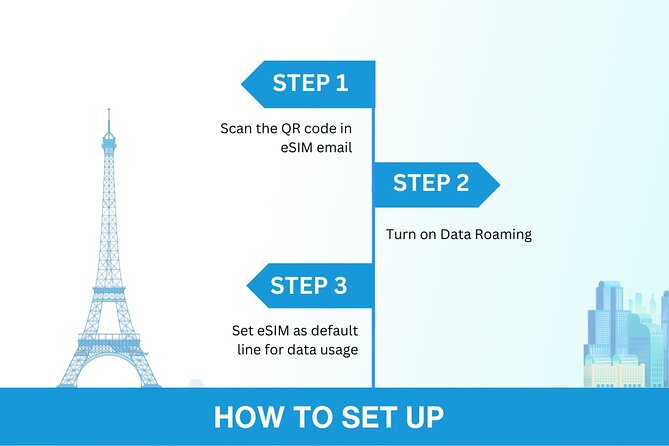
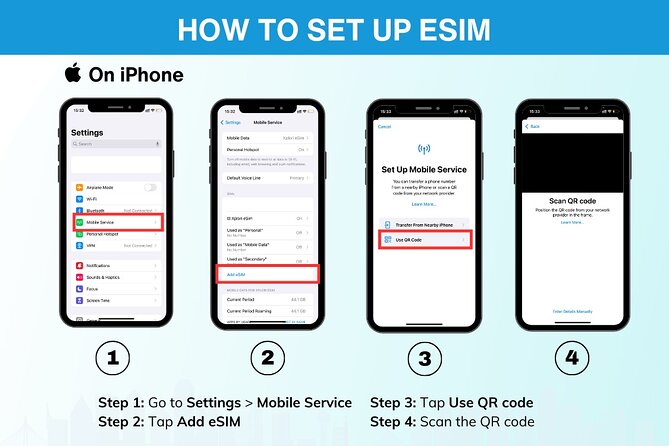
Activation is where these eSIM products can either feel effortless or slightly annoying. This one is designed to be straightforward: you receive the eSIM by email after ordering, then you activate it by scanning the QR code included in the email.
The time pressure is real. You want your phone ready before you need data the most. Your best move is to do the setup at home or in a calm moment in your hotel, before you land. That way, if something takes longer than expected, you are not stuck relying on airport Wi-Fi and frustration.
Phone compatibility matters more than anything
The instructions say to check your device supports eSIM. Examples listed include:
- iPhone XS and later
- Pixel 3 and later
- Samsung S20, S21, and Fold
If your phone model is not in that list, you should verify eSIM support on your device settings before you buy. This is not about brand loyalty. It is about whether the eSIM profile can install at all.
- Blue Mountains Small-Group Tour from Sydney with Scenic World,Sydney Zoo & Ferry
★ 5.0 · 3,709 reviews



Plan for a little patience
One practical point from the experience is that installation can take time and may be a bit difficult. That does not mean it fails. It means you should not treat activation like a two-click magic trick. Give yourself 15 to 20 minutes when you activate, and do it with a stable connection.
Your Digital “Start Point” in Sydney, and Why It Matters Less Than You Think
The experience lists Sydney NSW, Australia as the start point and says it ends back at the meeting point. For an eSIM, that can sound confusing, because you are not meeting anyone in person. What it really signals is that the service is tied to Australia as its baseline coverage, and you will use it once you arrive.
In real life, your “timeline” is:
- Order the eSIM.
- Receive it by email.
- Activate on your phone with the QR code.
- Use data when you are in Australia and New Zealand.
So do not overthink “meeting points.” Your main logistics are in your inbox and on your phone settings.
Using the eSIM in Australia: Cities, Maps, and Getting Around
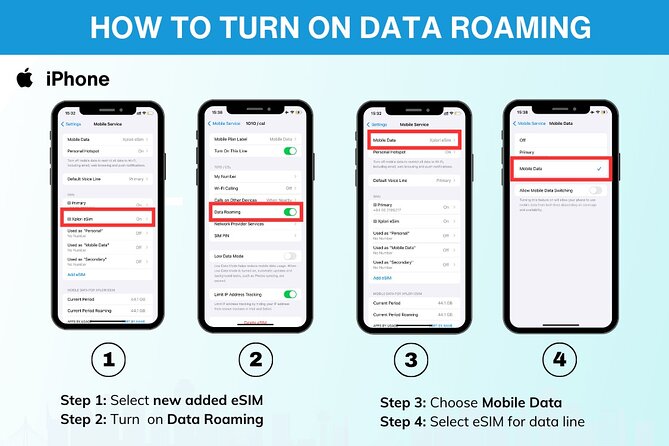
Once the eSIM is active, you get data on 4G/5G (where available) at local rates. This is the practical side of travel tech: you are not thinking about signal bars all day, you are planning stops and routes.
In Australia, the biggest wins usually come from:
- Navigation for trains, buses, and walking routes
- Getting updates for times, changes, and platform info
- Booking rides or checking schedules without hunting for Wi-Fi
Because you can activate within minutes, you can start using data quickly instead of spending your first day figuring out a new SIM.
One smart habit: manage your high-speed data
If you want to keep speed consistent, try to reduce unnecessary background use. Data caps and slowdowns are usually when apps refresh heavily. Turn off auto-play, reduce video, and keep an eye on which apps are chewing through bandwidth.
If you do hit the cap, your connection switches to 3G speed. Expect slower loads and less responsive maps, but you can still use the basics: messaging, browsing, and general navigation if you keep it simple.
Using the Same eSIM in New Zealand: The Big Benefit of One Plan
The standout advantage here is that the data plan covers both Australia and New Zealand. Many travelers do one of two things:
- Buy one SIM for the first country, then redo the process again later
- Depend on roaming, which can be pricey or unpredictable
With one eSIM plan, you avoid the switch. If your trip includes both countries, that alone can be worth it, even if the overall data amount is only “up to” a maximum.
What matters most after you cross the border
The critical point is continuity. Your experience is meant to keep your data available through your journey. You already have the active eSIM profile, so you are not trying to install a new plan in the middle of travel.
Again, once the speed cap is hit, it drops to 3G. So the goal is to spread your heavier usage across the trip when you still have full speed.
Support When Things Get Fussy: Remote Help by Email
Not every phone setup goes perfectly on the first try. That is why remote support is included: remote customer service via email.
The value of support is not just fixing an error. It is reducing your stress when you are away from home and your time is limited. If your activation feels stuck, you can contact the provider and keep moving.
Also, the experience includes a written guide in English. Even if it is short, having something you can read while you work through settings helps a lot.
Who This eSIM Is Best For (And Who Should Rethink It)
This is a good fit if:
- You want connectivity for navigation and daily phone use
- You are traveling between Australia and New Zealand and want one plan
- You prefer handling setup via email and a QR code
- You want to avoid buying a SIM at the airport and dealing with activation on the spot
It may not be ideal if:
- You plan heavy video streaming for many days
- You know you will blow through data quickly and can’t cut back
- Your phone does not support eSIM (or you are not willing to check compatibility first)
Quick Booking Logic: When to Plan and How to Prepare
You will often see these eSIM products booked ahead. Here, the booking timeline averages around 39 days in advance. That lines up with what I recommend: buy early enough to test activation in a calm moment, not at the airport.
Before you travel:
- Confirm your phone supports eSIM using your model
- Read your email carefully when it arrives
- Save the QR code details and activation steps somewhere you can find fast
- Plan one activation session with time to spare
If you are already in transit and the email arrives late, your best move is to activate at your first safe moment. The product is designed for quick connection, but you still want to give yourself room for setup.
Practical Tips to Get the Most From Your Data Package
I like eSIMs most when I use them with a plan. Here are practical habits that fit this package structure, including the speed cap and 3G fall back.
- Keep maps ready, not constantly refreshing. Download what you can when Wi-Fi exists.
- Avoid long video calls unless you have Wi-Fi.
- If you stream, do it sparingly while you are still on high-speed data.
- Turn off background video autoplay in apps.
- Use messaging apps more than social apps with media-heavy feeds.
The goal is to stretch the fast data portion so your trip stays smooth.
Should You Book This Australia and New Zealand eSIM?
I’d book it if you want an easy, low-cost way to stay connected in two countries with one activation. For $5 per person and the convenience of email plus QR-code setup, it is great value if your data use is mostly navigation, messaging, and everyday browsing. The included remote support by email also makes it feel safer than DIY SIM hunting.
Hold off or double-check your plan if you expect to use a lot of high-bandwidth media, because once you hit the capped amount, your speed drops to 3G. If your phone is not eSIM-compatible, this becomes a no-go, so confirm compatibility first.
If you want simple, practical coverage in Australia and New Zealand, this is the kind of small prep that makes the whole trip feel easier.
FAQ
Does the eSIM work in both Australia and New Zealand?
Yes. The data plan covers both Australia and New Zealand.
How do I receive the eSIM?
You receive the eSIM by email after you order. It includes details and a unique QR code for activation.
How long can I choose for the eSIM?
You can select a duration from 3 to 30 days.
What network speed will I get?
The plan provides 4G/5G data where available. After you use the included high-speed data amount, the speed switches to 3G.
Is my phone compatible with eSIM?
You need a phone that supports eSIM. Examples listed include iPhone XS and later, Pixel 3 and later, and Samsung S20, S21, and Fold.
What should I do if activation is difficult?
You can contact the provider through remote customer service by email for help. There is also a written English guide included.
Can I cancel and get a refund?
Yes. You can cancel for a full refund if you cancel at least 24 hours before the experience start time. If you cancel less than 24 hours before, the amount paid is not refunded.
More Tour Reviews in Sydney
- Blue Mountains Small-Group Tour from Sydney with Scenic World,Sydney Zoo & Ferry
★ 5.0 · 3,709 reviews